

Pipeline
The whole first round, in numbers.
Invites, interviews, scorecards and decisions, by role and by client, on one board. Every count opens to the interviews behind it.
Pipeline view · Built for staffing teams
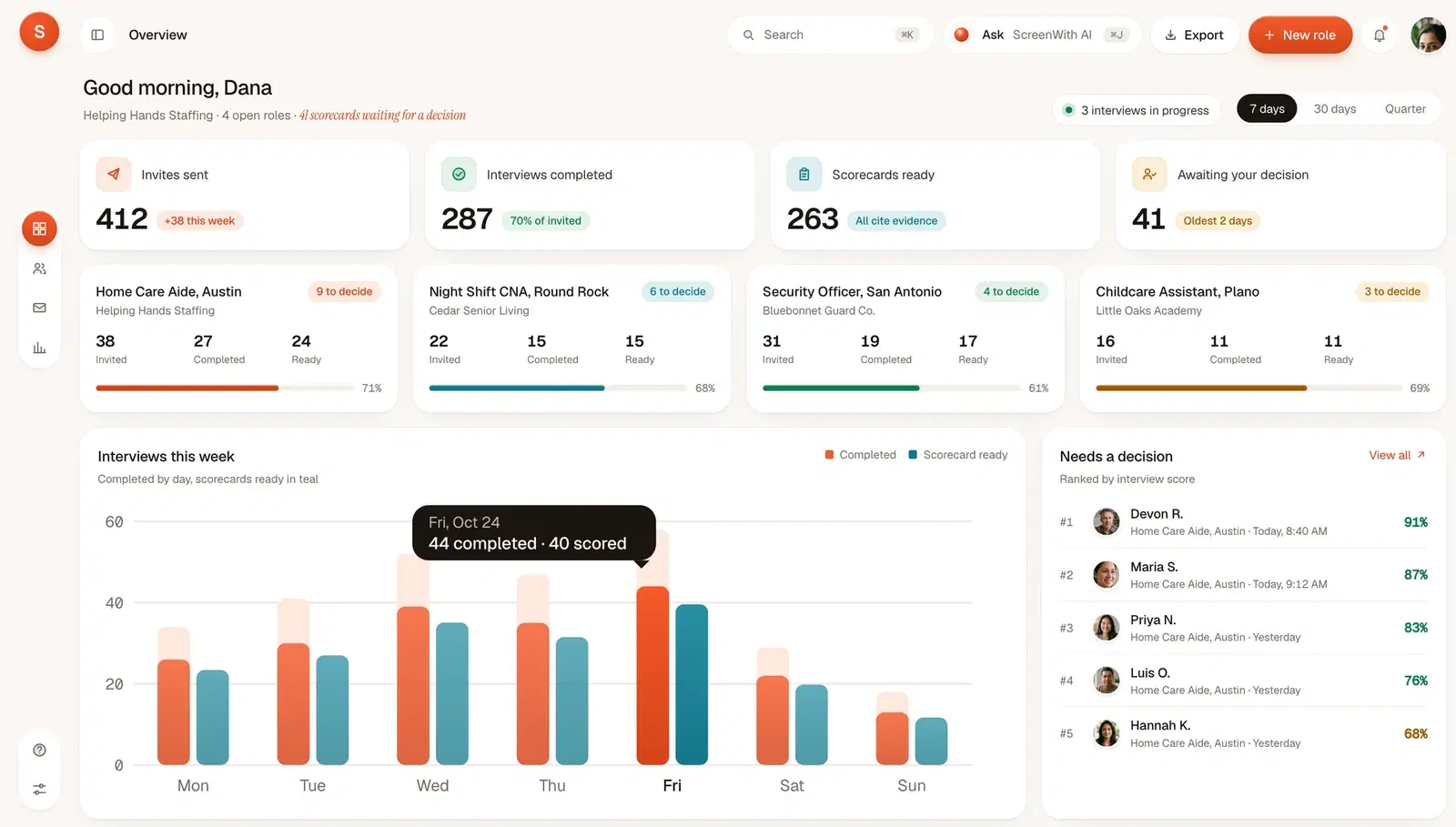
- 1 boardFor the whole first round
- Invites, interviews, scorecards and decisions, by role and by client.
- 6 stepsInvite to decision
- Invited, opened, started, completed, scored, decided. The same six for every role.
- LiveUpdated as interviews end
- A finished interview and its scorecard show up on the board without a refresh.
- 1 clickTo the interviews behind it
- Every count opens to its applicants, their scorecards and the quotes.
Fewer spreadsheets. Straight answers.
Where every role stands, who is waiting on you, and which step is leaking, without a spreadsheet.
Every role at a glance
Invited, completed and ready for each open role and each client, with the share that finished.
See where applicants stop
Opened but not started, started but not finished. The step that leaks shows up by role.
Numbers that open
Click a count to see the applicants behind it, each with a scorecard and the quotes.
01 · From invite to decision
Six views of the same first round.
01 / 06
Invited to decided, by role.
Six steps for every role. The drop between any two of them is a count you can open.
Invite to decision
Home Care Aide, Austin- Invited38
4 not opened yet
- Opened34
4 opened, not started
- Started30
3 stopped early
- Completed27
3 scoring now
- Scorecard ready24
9 waiting for a decision
- Decided15
Other open roles
Night Shift CNA
15 of 22 · 68%
Security Officer
19 of 31 · 61%
Childcare Assistant
11 of 16 · 69%
02 / 06
Interviews by day, scorecards beside them.
Completed interviews each day and the scorecards ready for them. Seven days, thirty days or the quarter.
Interviews by day
All roles- Started
- Completed
- Scorecard ready
- Invite to scorecard
- 1 d 5 h median
- Interview length
- 9 min 40 s median
- Scorecard to decision
- 1 d 9 h median
03 / 06
Which criteria get answered.
For each criterion, how many interviews settled it and how many came back Not established. A question that keeps missing is easy to spot and reword.
How the score is builtCriteria coverage
27 completed interviews- Met
- Partly
- Not met
- Not established
- CPR certificationmust-have23 stated · 4 not
- Evening and weekend availabilitymust-have18531
- Lifts and transfersmust-have20421
- Start date24210
- Dementia care86310
Not established in 10 of 27. The question is not landing: reword it or add a follow-up.
Edit question
Credentials are recorded as stated by the applicant. Checking them stays with your team.
04 / 06
Who decided, and when.
Advanced, on hold or declined, with the name and the time. Every decision stays with the record for four years.
How flag reviews are loggedDecisions
Home Care Aide · 7 days- DRAdvanced
Devon R.91%
Advanced
Dana R. · Today, 10:14 am
- MSAdvanced
Maria S.87%
Advanced
Dana R. · Today, 10:21 am
- PNOn hold
Priya N.83%
On hold · confirm Sunday availability
J. Rivera · Yesterday, 4:40 pm
- LOAdvanced
Luis O.76%
Advanced
J. Rivera · Yesterday, 4:12 pm
- JMDeclined
Jorge M.54%
Declined · no transfer experience, 02:55
Dana R. · Oct 23, 5:02 pm
- HKWaiting
Hannah K.68%
Scorecard ready, no decision yet
Waiting 2 days
Who decided and when, saved with the record for four years.
05 / 06
A board your client can open.
Share one role as a view-only link. Your client sees the funnel, the ranked list and the quotes, and nothing else.
Night Shift CNA, Round Rock
Shared by Dana R., Helping Hands Staffing
- Invited
- 22
- Completed
- 15
- Scorecards
- 15
- 1Rosa M.3 of 3 must-haves89%
- 2Ken T.3 of 3 must-haves84%
- 3Alicia F.2 of 3 must-haves79%
06 / 06
Every number, yours to take.
Download the table behind any view as a CSV, or pull the same counts from the API.
- Invite to decision, by roleCSV
- Interviews by dayCSV
- Criteria coverageCSV
- Decision logCSV
The filters you set carry into the file.
GET /v1/roles/home-care-aide-austin/pipeline
{
  "role": "Home Care Aide, Austin",
  "invited": 38,
  "opened": 34,
  "started": 30,
  "completed": 27,
  "scorecards_ready": 24,
  "decided": 15
}
The same counts from the API, or from your MCP client.
02 · Filters
By role, by client, by recruiter.
- Pick a role, a client or a recruiter
- Set the range: 7 days, 30 days or the quarter
- The filters carry into the export and the client view
By client
4 roles · 30 days| Client | Invited | Completed | Ready | Decided |
|---|---|---|---|---|
| Helping Hands Staffing | 38 | 27 | 24 | 15 |
| Cedar Senior Living | 22 | 15 | 15 | 9 |
| Bluebonnet Guard Co. | 31 | 19 | 17 | 13 |
| Little Oaks Academy | 16 | 11 | 11 | 8 |
| All clients | 107 | 72 | 67 | 45 |
Pick a client and the board, the chart and the export narrow to their roles.
03 · Questions
The numbers, plainly answered.
See it with one of your roles.
Bring a job post. We set up the role and walk you through the board with it.
Or email support@screenwith.ai
What does the pipeline view show?
For every open role: invites sent, opened, started and completed, scorecards ready, decisions waiting and decisions made. The same counts roll up by client, by recruiter and for the whole agency, for the date range you pick.
Can we see it by client?
Yes. Each role belongs to a client, so every count groups by client as well as by role. Pick a client and the board, the chart and the export narrow to their roles.
How current are the numbers?
Live. A completed interview and its scorecard appear on the board as soon as they are done, and the interviews in progress are counted on the same screen.
What counts as a completed interview?
An interview where the applicant reached the last question and ended the call. One that stopped early is counted as started, not completed, so the gap between the two stays visible.
Can a client see the board without an account?
Yes. Share one role as a view-only link. Your client sees that role’s funnel, ranked list and the quotes behind each score. They cannot edit anything or see other clients’ roles, and you can revoke the link at any time.
Can we export the numbers or pull them by API?
Yes. Any view downloads as a CSV with the filters you set. The same counts are available from the API and from your MCP client, so they can land in your own reports or your ATS.
Is every decision logged?
Yes. Advanced, on hold or declined, each decision records who made it and when, and stays with the applicant’s record for four years. Nobody is moved or rejected by the system itself.
Does the board rank or reject anyone?
No. It counts and shows. Ranking happens on each role’s ranked list by interview score, and every decision is made by a person on your team. No applicant is rejected automatically.
Interview everyone. Decide with evidence.
Your team makes the call. We handle the first round.